Shipping Label Sizes 4x6 Thermal: Complete Size Chart
You're standing at the pack station with a new case of labels that fit the box fine, but the printer crops the barcode, or your carrier software prints a longer label than the roll you bought. The size on the carton looked right. The printed result didn't.
That's the problem this guide solves for shipping label sizes 4x6 thermal and the smaller sizes around it. You'll match the label to your printer, your carrier output, and your print path before you buy by the case. You can shop shipping and handling labels and dispensers once you know which size and core you need.
Table of Contents
- Shipping Label Size Chart for Thermal Printers
- Why 4x6 Is the Default Thermal Shipping Label
- When 4x6.75, 2x1, 3x1 and 4x2 Labels Fit Better
- Direct Thermal vs Thermal Transfer Labels
- Label Stock for Harsh Conditions
- Matching Labels to Your Label Printer
- Roll vs Fanfold Labels and Core Sizes
- How to Choose Your Label Size in Five Steps
- Test the Full Print Path Before Bulk Buying
- Shipping Label Questions Answered
- Can a 2x1 Label Run on a 4x6 Printer
- Do I Need a Different Printer for 4x6.75 Labels
- How Many Labels Fit on a Roll
- Which Stock Lasts in Cold Storage or Condensation
- Can a Thermal Printer Use Sheet Labels From an Office Printer
- How Do I Know if My Printer Uses Direct Thermal, Thermal Transfer, or Both
- Shop Labels, Ribbons and Printers in Stock
Shipping Label Size Chart for Thermal Printers
| Label Size | Typical Use | Where It Is Common | What to Check |
|---|---|---|---|
| 4x6 inch | Parcel labels for UPS, FedEx and USPS | Most desktop and industrial thermal printers | Printer width and roll outside diameter |
| 4x6.75 inch | Carrier thermal label with a document tab | Printers with enough print length and width | Carrier format and printer maximum media width |
| 2x1 inch | Small product, bin and barcode labels | Desktop and small label printers | Print width and label sensor |
| 3x1 inch | Small address or item labels | Desktop thermal printers | Print width and roll core size |
| 4x2 inch | Short inventory and shelf labels | Warehouse and inventory label printers | Print width and roll outside diameter |
Read the chart as a starting point, not a purchase order. A 4x6 inch label is the carrier standard for UPS, FedEx and USPS, and it's the size most mainstream thermal printers handle without special setup.
The other sizes solve narrower jobs. Your final fit still depends on printer width, roll size, and what your carrier software sends to the printer.
A roll can measure 4x6 and still print wrong if the software sends a different page size.
Why 4x6 Is the Default Thermal Shipping Label
Carriers built their parcel workflows around 4x6, and printer makers built 4 inch printheads to match. That pairing is why you see this size everywhere.
There's a standards reason too. The GS1 Logistic Label Guideline identifies A6 (105 x 148 millimeters) and 4 x 6 inches as compact logistics label formats for a Serial Shipping Container Code, or that code plus limited extra data. A 4x6 label measures about 101.6 x 152.4 millimeters, close to A6 in footprint.
GS1 doesn't mandate one universal size. Dimensions depend on data amount, barcode X-dimension, label content, and package size, though GS1 recommends holding compact label width near 105 millimeters, about 4 inches, and varying height as data changes.
In daily use, 4x6 gives you room for the carrier barcode, address, routing details, and readable text without covering too much of the box. Treat it as a widely accepted standard, not a legal requirement.
When 4x6.75, 2x1, 3x1 and 4x2 Labels Fit Better
4x6.75 Inch Labels
This is a FedEx thermal format with a document tab. The extra length runs in the feed direction, so your printer's maximum printable length matters more than extra width. Don't assume a printer that handles 4x6 automatically handles the longer tab cleanly.
2x1 and 3x1 Inch Labels
Use 2x1 for small product, bin, and barcode jobs where a parcel label would wrap or cover the item. Use 3x1 when you need a short address or item line with a bit more width. At these sizes, leave enough quiet space around the barcode, or the scanner will struggle even if the print looks sharp.
4x2 Inch Labels
The short height suits inventory and shelf labels where the labeling area is shallow. You get full 4 inch width for text and codes without wasted vertical space.
Choose by item area first, then confirm the printer feeds it and the barcode scans at full size. A small label on a poorly matched layout also means more roll changes and more waste per label.
Direct Thermal vs Thermal Transfer Labels
The difference starts with how the image forms. In direct thermal printing, the printhead heats heat-sensitive stock and the label itself creates the image. In thermal transfer printing, heat moves ink from a ribbon onto the label.
The Zebra ZD200t user guide states that thermal transfer media requires a ribbon while direct thermal media does not, and it warns you not to load a ribbon when printing direct thermal media.
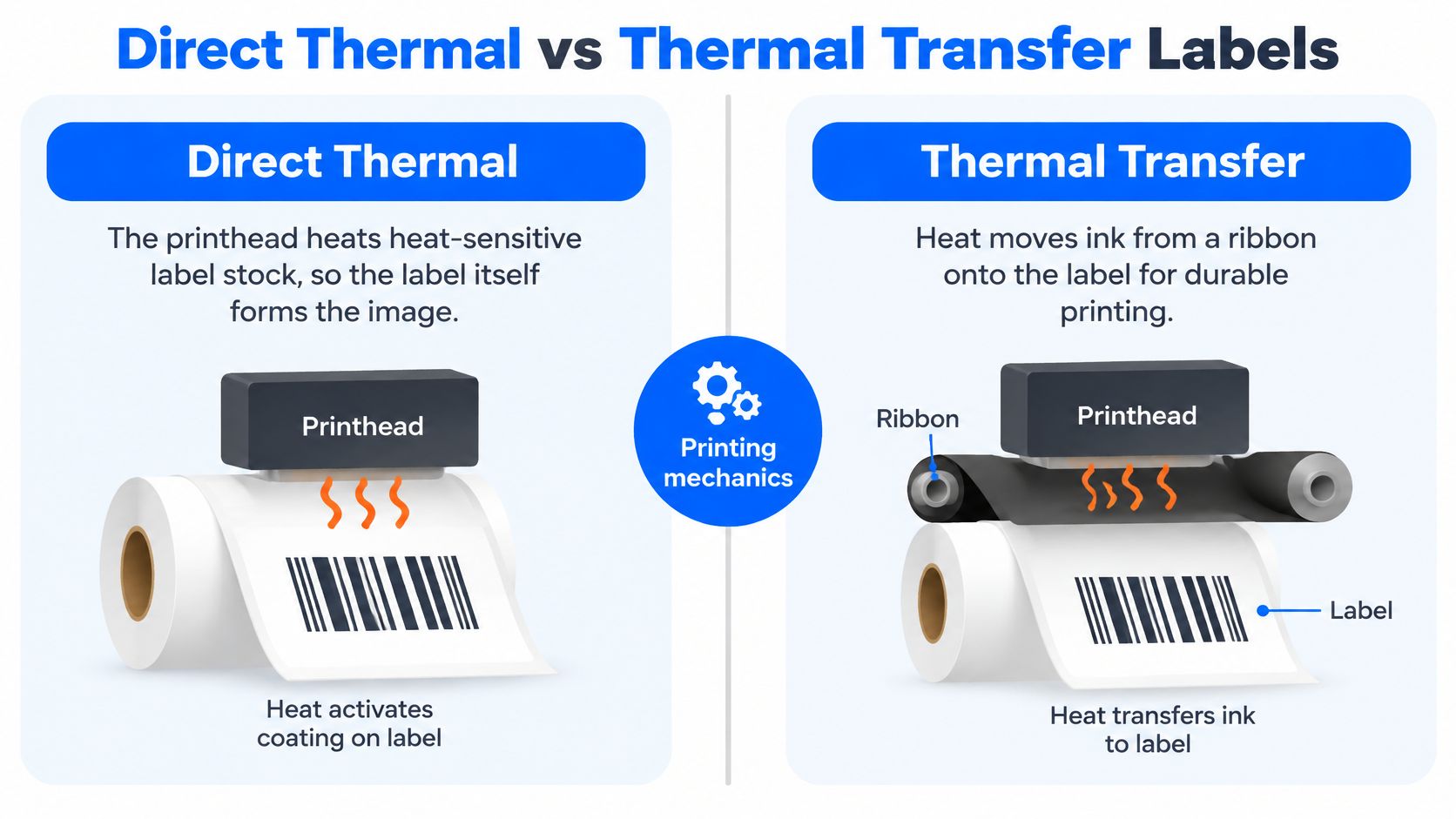
| Feature | Direct Thermal | Thermal Transfer |
|---|---|---|
| How the image forms | Printhead heats heat-sensitive label stock | Ribbon transfers ink onto the label |
| Ribbon needed | No | Yes, with matching width, core and winding direction |
| Label life | Short, typically days for parcel labels | Long, typically months for labels kept in place |
| Best for | Short-cycle parcel shipments | Labels that must last, such as asset or archive labels |
Use this rule. Pick direct thermal for shipping labels that live for days. Pick thermal transfer with ribbon for labels that must last months. Some transfer printers can also run direct thermal mode when the printer allows it.
For transfer work, match ribbon width, core, and winding direction before you order. You can shop barcode labels and ribbons for ribbon and matching stock in one place.
Label Stock for Harsh Conditions
4x6 names dimensions, not construction. Two rolls with the same size can behave very differently because face material, coating, adhesive, liner, and overall thickness decide whether the barcode stays readable.
Think about your worst case first. Cold storage, outdoor staging, condensation, abrasion, long dwell times, and poly mailer flexing each stress a label differently. A product example on SizeMarker's 4x6 shipping label size page describes phenol-free direct thermal paper at roughly 5.3 mil overall thickness, which shows that thickness and coating vary by product, so check each spec sheet.
A Short Stock Test
- List the worst exposure the label will face.
- Ask for the build specs, including face material, coating, adhesive type, and thickness.
- Match stock to exposure, using direct thermal for short parcel dwell and transfer with a suitable ribbon for longer life.
- Run a scan test in your cold room, damp area, or on a flexed poly mailer before you order a pallet.
Where handling scuffs are the main risk, shop label protection tape as an added layer. The test result, not the size name, decides your stock.
Matching Labels to Your Label Printer
A roll marked 4x6 does not guarantee a 4x6 print. Three things decide the output: the printer's media limits, the driver's page setup, and how the sensor reads the gap between labels.
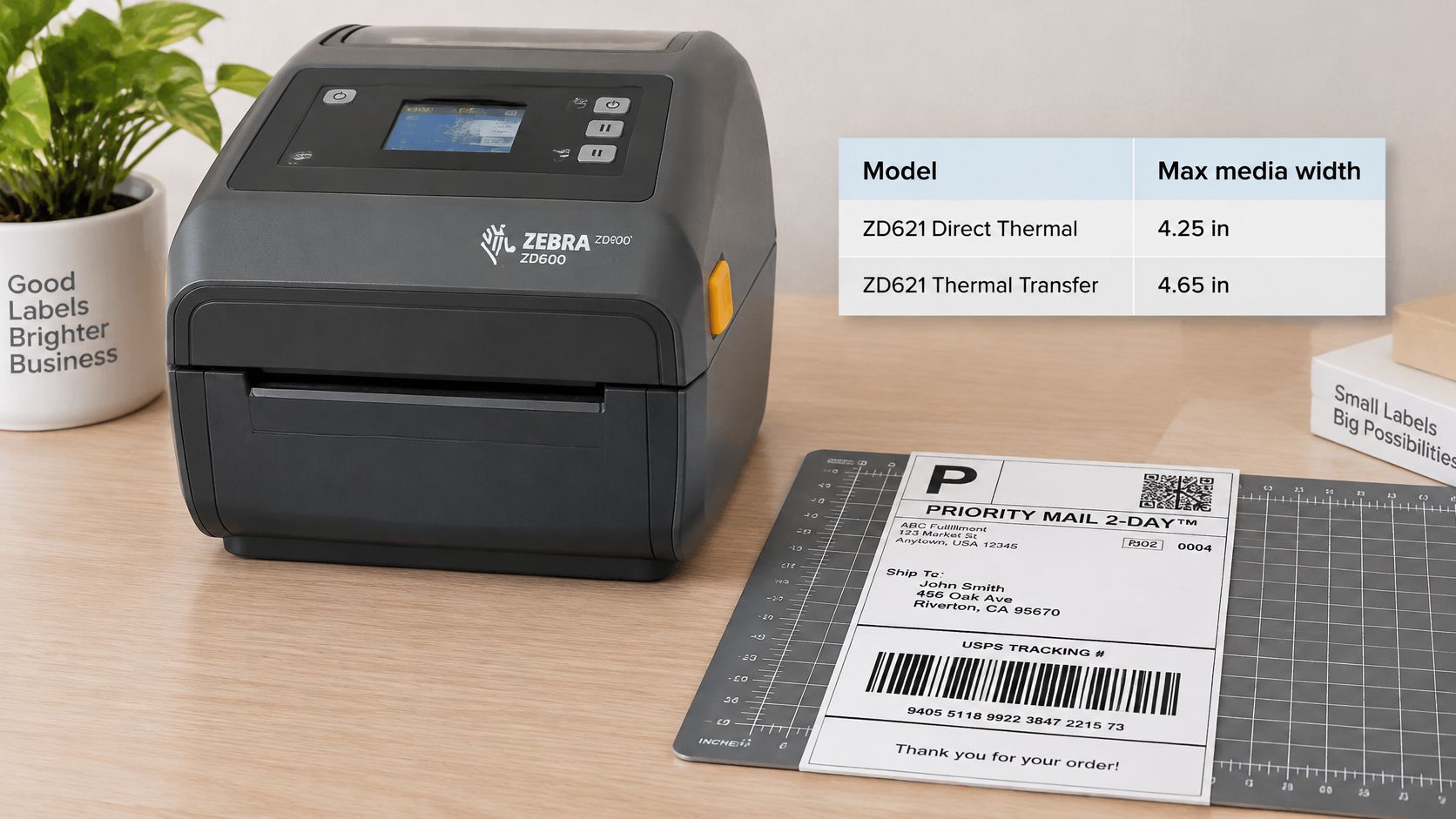
Start with your printer's spec sheet and use it as a fitting template. The Zebra ZD600 series specification sheet lists a maximum media width of 4.25 inches for the direct thermal ZD621 and 4.65 inches for the thermal transfer ZD621, plus a maximum roll outside diameter of 5 inches. A 4x6 label clears both width limits.
Length needs a second check. A 4x6.75 label runs its 6.75 inch dimension in the feed direction, not across the printhead, so confirm the maximum printable length as well.
Then match the driver. If the software page size says 4x6 but the loaded roll is 4x2, the printer will center, crop, or stretch the layout. Set the page size to the label in the printer, then run a calibration so the sensor finds the gap and each print lands inside the borders.
Practical rule: a printer can accept the right label width and still reject a roll whose outside diameter or sensor setup doesn't fit.
This video shows the printer side of the setup before you load media.
Run the same three checks against your spec sheet every time: media width, printable length, and driver page size. Carrier label sizing is a different job from the artwork on a retail package; if a product rebrand is also on your list, this guide on how to redesign food and consumer goods labels covers that side. For hardware that matches these widths, shop barcode label printers.
Roll vs Fanfold Labels and Core Sizes
A roll marked 4x6 can still arrive unusable. The label size is right and the core is wrong, so the printer refuses to load it.
Rolls wind around a core, so your printer must accept both the core inside diameter and the maximum outside diameter. The core works like the hole in a spool of thread: if it doesn't match the spindle, the roll won't turn. Fanfold stock arrives as an accordion folded stack with no core, but it needs a rear or bottom feed path and clearance behind the printer for the stack.
The Zebra TLP 2824 Plus specification identifies support for roll-fed or fan-fed labels, lists 1 inch and 1.5 inch roll cores for that printer, and lists a maximum roll outside diameter of 5 inches.
| Format | How It Loads | Core Needed | Best For |
|---|---|---|---|
| Roll, per ZD600 spec sheet | Wound roll loads onto a spindle | 0.5 or 1 inch, adapters for 1.5, 2 or 3 inch | Compact storage and frequent automated feeding |
| Roll, TLP 2824 Plus spec | Wound roll loads onto a spindle | 1 or 1.5 inch | Printers that accept 1 or 1.5 inch cores |
| Fanfold | Folded stack feeds through a rear or bottom path | No core | Large label counts with fewer roll changes |
Core sizes vary by model, so a number that fits one printer can fail on the next. The Zebra ZD600 series specification sheet lists 0.5 and 1 inch cores as standard, with 1.5, 2, and 3 inch cores supported through optional adapters.
Pick rolls for compact printer side storage and frequent automated feeding. Pick fanfold when a large label count with fewer roll changes matters, after you confirm the approved feed path and media sensing method. Either way, match the core inside diameter and outside diameter to the spec sheet before you order by the case.
How to Choose Your Label Size in Five Steps
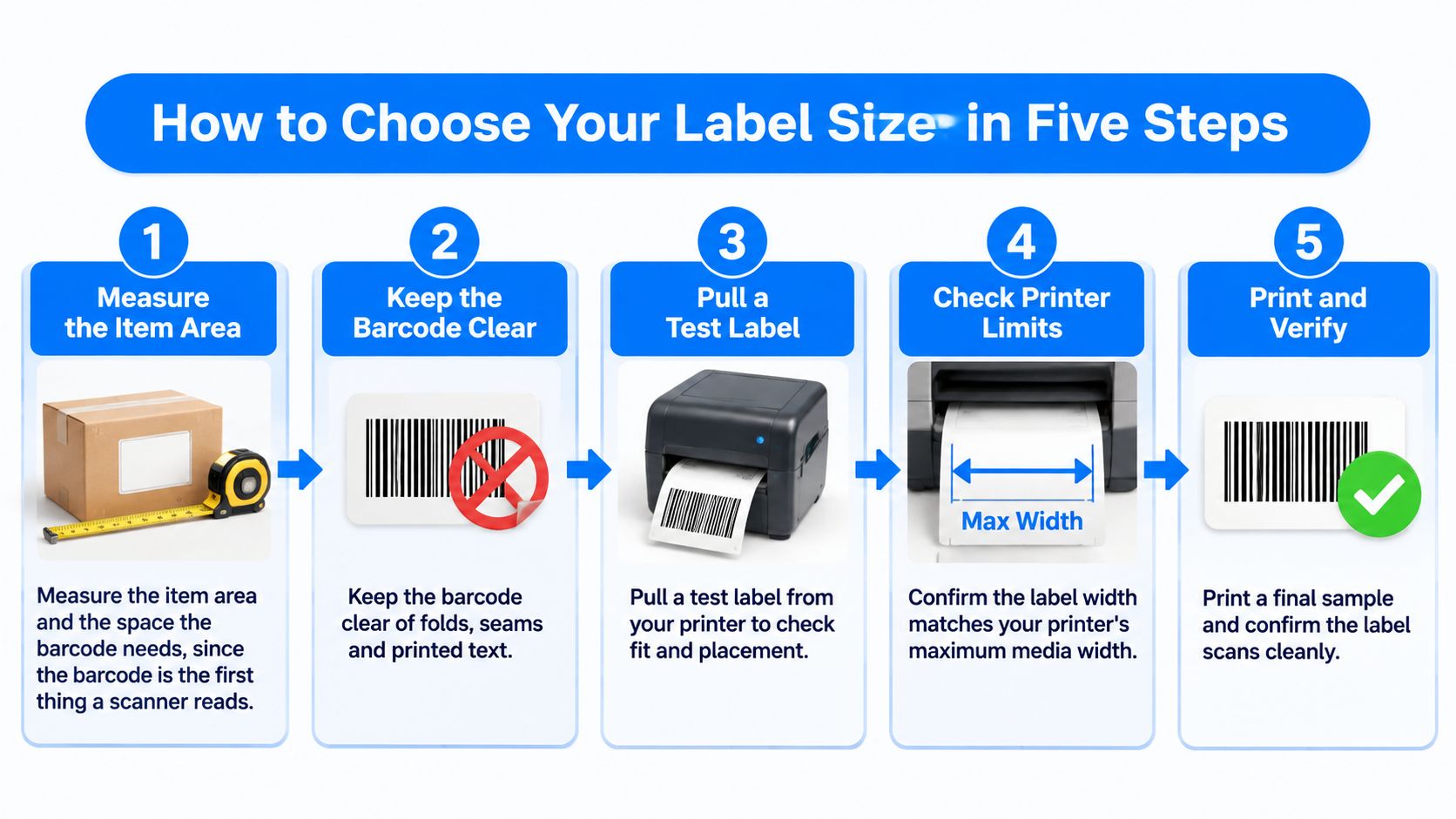
- Measure the item area and the space the barcode needs. Keep the barcode clear of folds, seams, and printed text.
- Pull a test label from your shipping account or software and read its printed size. If your team builds labels through connected stores, this overview of how to create shipping labels with API2Cart helps you see where that output is generated.
- Compare printer limits for label width, roll outside diameter, and core size against the spec sheet.
- Pick the size that fits the layout and matches carrier output. Use 4x6.75 only when the shipment needs a FedEx document tab. If box space is the limit, check our corrugated box sizes chart guide before you shrink the label.
- Choose the media type by label life, then confirm the core size before you buy a case or pallet.
Skip none of these checks. The common slips are skipping the carrier check, buying a roll too wide for the printer, and ordering size before you set the printing method. Finish with one label size, one media type, and one core size you can reorder with confidence.
Test the Full Print Path Before Bulk Buying
The roll size isn't always the printed size. Carrier output varies by integration, file type, printer language, and scaling settings, so software can add blank space, crop content, or scale the barcode.
The EasyPost shipping label sizes support page reports that UPS may return a 4x7 label by default, while a true 4x6 result for PNG may require support activation, and the extra inch is often blank space. It also notes USPS identifies 4x6 as its preferred size, UPS supports 4x6 or 4x8 for extended information, and FedEx uses formats including 4x6 and 4x6.75 with a document tab.
Your Pre-Purchase Check
- Print one label through each path your team uses, such as PDF, PNG, ZPL, EPL, and browser printing.
- Test each carrier account you ship from.
- Measure blank space and confirm the barcode scans at full size.
- Confirm nothing is cropped or scaled.
- Order a case or pallet only after every path passes.
Treat 4x7 or 4x8 output as intentional when the carrier supports extended information, not as a stock error. Teams tightening stock control alongside label tests may also find this guide to inventory management for small UK businesses useful background, even if your operation is US based.
Shipping Label Questions Answered
Can a 2x1 Label Run on a 4x6 Printer
Often yes, if the label width and roll diameter fit and the media guides adjust down. Run a scan test, because sensor position matters at small sizes.
Do I Need a Different Printer for 4x6.75 Labels
Only if your printer's maximum printable length is shorter than 6.75 inches. Check that line on the spec sheet before you buy stock.
How Many Labels Fit on a Roll
That depends on label length and roll length. Check the label count in the product spec rather than guessing from roll diameter alone.
Which Stock Lasts in Cold Storage or Condensation
Check face material, coating, and adhesive, then run a scan test under your own conditions. Don't decide from the size name alone.
Can a Thermal Printer Use Sheet Labels From an Office Printer
No. Thermal labels need a thermal printer, while laser and inkjet sheet labels use a different format and feed path.
How Do I Know if My Printer Uses Direct Thermal, Thermal Transfer, or Both
Check the printer spec for supported media and look for a ribbon path inside the printer. Do that before you buy ribbon or transfer stock.
Shop Labels, Ribbons and Printers in Stock
Your print-path testing already produced three answers: the size your printer and carrier passed, the media type that survived your conditions, and the core and roll format your printer accepts. Those three facts tell you which category to shop. Start with shipping and handling labels and dispensers in stock for 4x6, 4x6.75, and the smaller sizes covered in this guide.
For longer-life labels, the barcode labels and ribbons category holds thermal transfer ribbon and matching stock. For hardware, the barcode label printers category holds desktop and industrial models built for the widths and cores covered in this guide. Label protection tape is a related add-on when labels face rough handling in transit.
Material Handling USA is a Salt Lake City online store that has supplied industrial products since 1997, with 58,000+ in-stock SKUs across 11 product categories and nationwide shipping. Its Packaging & Shipping range covers barcode labeling and scanning, packing tape, and protective packaging, so labels can ship in the same order as the rest of your replenishment.
Volume pricing is available, and orders come with secure checkout and 30-day returns. Visit Material Handling USA to order online, or call a U.S. product specialist at 1-800-326-4403 for help matching size, media, and core before you buy.